Backchat
Backchat turns reading into a conversation. Highlight what matters, add your thoughts, connect ideas across books and return to the exact passage in a click. Daily highlights resurface forgotten insights, while local files keep your library, progress and notes private, portable and truly yours.
Backchat has moved to its own address
Backchat now lives at backchat.jonathandutoit.com. It no longer runs on this page. If you used it here, your library is still in your browser. See below, Moving your library.
Moving your library
If you used Backchat on this page, bring your library across like this:
- You connected a folder. Open the new address, backchat.jonathandutoit.com, choose Settings > Connect a folder, and pick the same folder. The preview will say nothing is in your library yet. That is expected. Confirm, and everything comes back.
- You use sync. Open the new address and turn on sync with your relay address, token and passphrase, or open a setup link from another device.
- You used the browser only. In the same browser, open jonathandutoit.com/backchat-archived/, which stays up until 31 January 2027. Tap Save to download a backup, then open the new address and tap Load.
- You added it to your home screen. Add the new address to your home screen and delete the old icon.
Somewhere there is a list of every line you have ever highlighted. Years of it. You have probably never read those highlights again.
Try something. Think of a book you finished last year and loved. Name three lines you marked in it. Now find one of them, word for word, in under a minute.
Most people can't, and it isn't because they read carelessly. The marks were made with real attention, at the moment a sentence changed how they saw something. Then the marks went somewhere they could not easily follow.
Blame the storage before you blame your memory.
Picture a library book. Mark it up (please don't), return it, and your notes stay with the library. Nobody finds that strange, because the book was never yours. Most digital reading works the same way, except you paid for the book. Your highlights live inside the store that sold it to you, and they follow the store's rules. On Kindle, many publishers set a clipping limit: past a share of the book, commonly around a tenth, your own highlights can no longer be exported. Take a book you marked heavily and try to carry every highlight out as plain text. You may find the limit by hitting it.
The reading apps are not villains. They are stores, and a store is built to sell you the next book. Your notes are a reason to stay, so they are held captive. The result is a strange piece of arithmetic: the book is yours to read, but the thinking you did about it is not quite yours to keep.
What Backchat is
Backchat is a free reader for EPUB books that runs in your browser and keeps everything you write about a book in plain files you own.
Open a book and talk back to it. Highlight a passage. Add a comment beside it. Write in the margins, a running page of your own thinking for each book. Copy a link that opens the exact passage, and connect one book to another. Later, search across every book at once: what the books said, what you said back, or both. Your notes stop being a pile and start being material, for an essay, a decision, a conversation, a second reading.
The difference sits underneath. There is no account and no server. Backchat is a single web page that runs entirely on your device, and nothing you read or write leaves it unless you choose to sync. Connect a folder on your computer, and Backchat writes every book into it as an EPUB and every book's notes as a Markdown file: plain text, readable by any app, yours whether or not Backchat exists in ten years. If you keep notes in Obsidian, point the folder there. Your reading lands beside your own writing, each book linked to the next.
Why I built it
I bought thousands of books. Then I had to leave the country of my birth, and the library could not come with me. Every underline, every scribble in a margin, every place I had talked back to a book was left behind.
Paper notes were mine, but too heavy to carry. Digital notes were light, but never quite mine. I wanted both.
I read the way a miner works a seam, and podcasts get the same treatment as books. I spent real money on tools along the way, Readwise among them. Highlights sat in one app and notes in another. Podcasts, where so much of the best thinking now happens, offered nothing to mark at all. You can't underline a conversation.
So I built the reader I needed. Then I built a companion app, Video Epub Book for Backchat, that turns a YouTube podcast and its transcript into an EPUB. An episode of Founders or Modern Wisdom becomes a book like any other, with the video playing at the top of my notes, so I can listen, read, highlight, comment, and connect it to other books and other episodes.
The library grew, and kept growing. Let's say Backchat was born out of frustration.
The obvious objections
You may be thinking that Kindle, Apple Books and Readwise already do this. They are polished and supported by companies with staff, and if your notes never need to leave them, they will serve you well. Backchat cannot match their polish. It does one thing they are not built to do: hand your notes back to you, all of them, as files.
You may be thinking this sounds like a setup. It is less than it sounds. Open the address and Backchat starts with a guide book already inside, marked up so every feature has something to show you. Adding a book of your own is just one tap of the + Add Epub.
And there is an honest limit. Backchat opens EPUB files without copy protection. Books bought on Kindle are locked to Kindle, and Backchat can't open them. Plenty of publishers and stores sell DRM-free EPUBs, and tens of thousands of classics are free from Project Gutenberg and Standard Ebooks. But if your whole library lives inside one store, that store holds the key. My own way around it: most of what I read in Backchat now is podcasts turned into books.
What a machine cannot read for you
A summary of almost any book is now a few seconds away. Ask a machine what a book says and it will tell you, competently and you may feel smarter. What it cannot tell you is what a book does to you: the line that stabbed you in the chest, the argument you had with the author, the conclusion you reached on page 140. That reaction is the one part of reading nobody else can produce. It used to live in the margin. It deserves better than the back room of a store.
The technology caught up at the same moment. Desktop browsers such as Chrome and Edge can now connect to a folder on your computer, run a full application offline, and encrypt data before it leaves the device. Not long ago, a tool like this needed a company and a server behind it. Now it fits in one web page.
Fifty versions and many many failures
Backchat is the reader I use for my own library, and it has been through more than fifty versions (only when I first started adding versions, before that was by date backchat-03-12-2025). Some of them fixed problems that only real use reveals. The first search buckled at 270 books, swelling past 300 megabytes of memory; the rebuild keeps its index on disk and runs the same library in under 50. An audit found that, across two devices, deleting a highlight did not stick, so deleted marks quietly came back. Deletions now travel between devices like any other change. A tool that only reports its successes is an advert. Those were two failures, and there were many more.
The code is public on GitHub under the MIT licence. You don't have to take my word for what it does. Anyone can read it, and anyone can host their own copy.
A tool that wants nothing
Backchat asks for nothing. No email, no account, no payment, no tracking. There is nothing to upgrade to and nothing being sold. I built it for my own reading and share it as it is, with no promise of support or a roadmap. That sounds like a weakness. It is the reason you can trust it: a tool that wants nothing from you has no reason to hold on to you.
Your notes never pass through anything I run. If you want your phone and computer in step, you set up your own small relay on a free Cloudflare account, about fifteen minutes in a browser with a guide beside you. Before anything is sent, Backchat encrypts your notes with a passphrase that never leaves your device, so the relay only ever holds scrambled data.
So what do you stand to lose? An afternoon, if you like it. If you don't, forget the address and keep the folder: every note you made is still there, in plain text, readable by anything.
One caution is worth hearing. A browser on its own is a fragile home, and phone browsers can clear a site's storage. Phones also can't connect to a folder, which is why I set up sync. If you would rather not, Backchat can hand your notes from phone to computer as a file, and the Save and Load buttons keep a full backup of everything in one file. I'm from the floppy-disk days, and the rule hasn't changed: back up, no matter what. Save, then Load. Easy as.
Start with one book
Open backchat.jonathandutoit.com. Spend five minutes in the guide book. For now it is an AI-written demonstration, there to be marked up. Then add one DRM-free EPUB you have been meaning to read properly. Derek Sivers sells his books directly, EPUB included, and many authors sell PDFs that a free tool like Calibre can convert to EPUB, with mixed results on complex layouts. Mark one chapter the way you would mark paper. Underline what lands. Argue in the margin. Write down what it changes. When you are ready, connect a folder on your computer and watch your notes appear as files.
Then run the test from the beginning again. Think of a line you marked. Find it.
A book is written for everyone. Its margins are written by you.
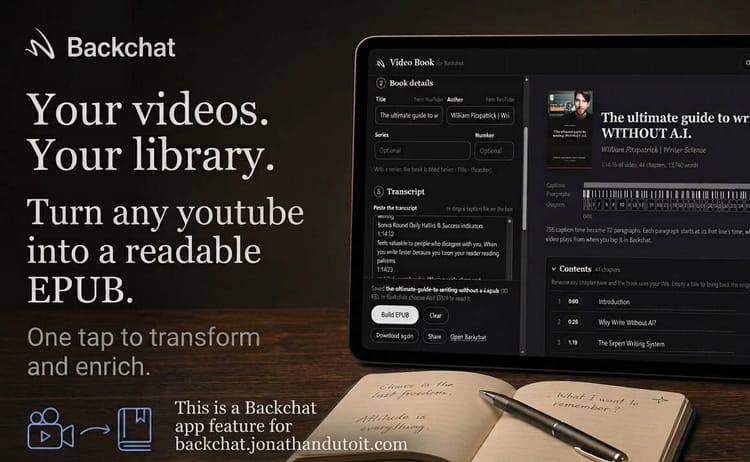
Video Epub Creator for Backchat
joins a video's caption lines into paragraphs and chapters, and saves them as an EPUB: plays video while you read, highlight and write in the margins.
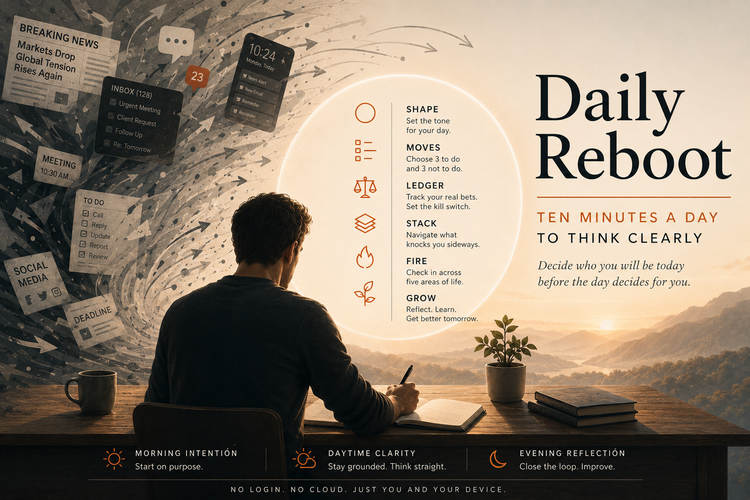
Daily Reboot
Most days start before you do. Daily Reboot gives you ten minutes to set the day and ten to close it, plus a way to think clearly when something knocks you sideways. It runs in your browser, and nothing you write ever leaves your device.
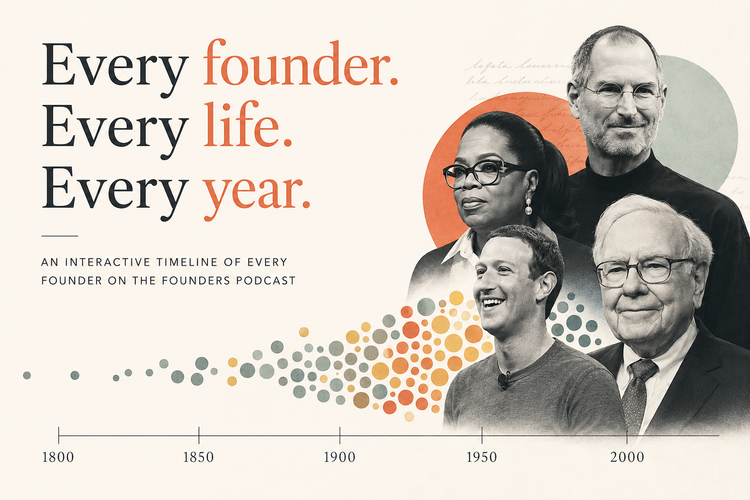
Founders Podcast Constellation
An experimental timeline that organizes every founder featured on the Founders Podcast into a single interactive view with episode and book links.